Hilfe
Hilfe

 Neues Thema
 Antworten




 geschrieben
 ich habe Win XP Pro + SP3 + alle Sicherheitsupdates bis ca. Ende 2009, sowie
Office 2003 Pro + SP3 + alle Sicherheitsupdates bis Ende 2009 installiert.
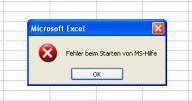
Folgende Fehlermeldung (siehe Bild) erhalte ich, wenn ich die MS Excel Hilfe aufrufe:
„Fehler beim Starten von MS-Hilfe“.
Die Windows Hilfe, sowie die Hilfe der anderen Office Programme funktionieren einwandfrei.
Auf einem anderen Rechner habe ich genau die gleiche Installation, sowie die Updates laufen. Dort funktioniert auch die Excel Hilfe.
Auf dem „Problemrechner“ läuft IE 7.
Der Duden Korrektor ist installiert – auch in Excel.
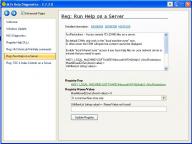
Ausprobiert habe ich schon dieses Programm:
http://www.helpware....s/index.htm#MJs
Das brachte jedoch keine Abhilfe.
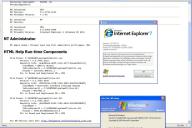
Den Report von diesem Prog habe ich unten rein kopiert.
Was mir noch einfällt ist, dass ich mal für die Installation eines älteren Programms ein Windows Update Patch deinstallieren musste.
Dieses habe ich danach wieder installiert. Ich weiß aber nicht mehr, welches Patch es war und seit wann das Problem mit der Excel Hilfe existiert.
Auch die „hh.dat“ hatte ich gestern mal probeweise umbenannt.
Beim Starten der Word Hilfe wird sie sofort neu erstellt.
Beim Starten der Excel Hilfe (mit Fehlermeldung) wird sie nicht neu erstellt.
Die „hh.exe“ ist auf meinem System auch nur einmal vorhanden – im Windows Ordner.
Ebenfalls habe ich über Systemsteuerung / Software schon mal die Excel Hilfe auf „Erst bei der ersten Verwendung installieren“ gesetzt (ganz deinstallieren kann man sie nicht) und auch schon eine Office Reparaturinstallation drüber laufen lassen.
Da ich in der nächsten Zeit die Excel Hilfe dringend brauche habe ich die Frage, ob hier jemand vielleicht das Problem kennt, oder auch aus anderen Gründen eine Lösung kennt?
Vielen Dank vorab!
Gruß,
Max
ZITAT
----------------------
MJ's Help Report:
A common problem with HTML Help 1.x is DLLs not correctly registered during installation. This utility checks all components and registers DLLs if required. We also report if the RoboHelp DLL is registered, and if MS Help 2 components are installed and registered.
After running the report, try running your program again to see if the fault has cleared.
General Info
Report EXE: E:\JDownloader\MJsDiag\MJsDiag.exe
Report Run Date: 07.05.2010 06:53:43
Report EXE Version: 2.7.2.0
Download URL: http://helpware.net/downloads/
Operating System: Windows NT 5.1.2600
SysLocale.DefaultLCID: 0x0407 (1031)
SysLocale.PriLangID: 0x0007 (7)
SysLocale.SubLangID: 0x0001 (1)
DecimalSeparator: ,
HH Installed: YES
HH Version: 5.2.3790.4110
HH Friendly Version: > 1.4a
H2 Installed: NO
H2 Version:
IE Installed: YES
IE Version: 6.0.2900.5880
IE Friendly Version: Internet Explorer 6 (Windows XP SP2)
NT Administrator
NT Admin Check: Current user has full administor privileges: YES
HTML Help Run-time Components
File Found: C:\WINDOWS\system32\hhctrl.ocx
Version = 5.2.3790.4110
Registry Info: {adb880a6-d8ff-11cf-9377-00aa003b7a11}
ClassName = HHCtrl Object
InProcServer32 = C:\WINDOWS\system32\hhctrl.ocx
ProgID = Internet.HHCtrl.1
DLL is Found and Registered OK = YES
File Found: C:\WINDOWS\system32\itss.dll
Version = 5.2.3790.4186
Registry Info: {5D02926A-212E-11D0-9DF9-00A0C922E6EC}
ClassName = Microsoft InfoTech IStorage System
InProcServer32 = C:\WINDOWS\system32\itss.dll
ProgID = MSITFS1.0
DLL is Found and Registered OK = YES
File Found: C:\WINDOWS\system32\itircl.dll
Version = 5.2.3790.2453
Registry Info: {4662DAA5-D393-11D0-9A56-00C04FB68BF7}
ClassName =
InProcServer32 = C:\WINDOWS\system32\itircl.dll
ProgID = ITIR.WordWheelBuild.4
DLL is Found and Registered OK = YES
For HH Version Info See: http://helpware.net/...elp/hh_info.htm
HTML Help 1.x Registry Settings
Description: If present this Key can disable HH Shortcuts and HH WinHelp commands on the local PC
Reference: KB 810687, KB 323180
Key: HKEY_LOCAL_MACHINE\SOFTWARE\Policies\Microsoft\Windows\System\
Value: HelpQualifiedRootDir (string value) =
-> Report: Policy is not enabled. HH Shortcuts are not restricted on local machine.
Description: This key can be used to enable Hhctrl.ocx ActiveX Visual controls on servers
Reference: KB 892675
Key: HKEY_LOCAL_MACHINE\SOFTWARE\Microsoft\HTMLHelp\1.x\HHRestrictions
Value: UrlAllowList (string value) =
Value: MaxAllowedZone (string value) =
-> Report: Settings reported for information only.
Description: This key allows MS programs such as iexplore.exe to open ITS file that do not have a .CHM file extension
Reference: KB 873343
Key: HKEY_LOCAL_MACHINE\SOFTWARE\Microsoft\HTMLHelp\1.x\HelpRestrictions\AllowedExtensions
-> Report: No special file extensions have been enabled on this PC.
Description: This key can be used to allow access to remote ITS files
Reference: Win 2003 SP1, KB 896054
Key: HKEY_LOCAL_MACHINE\SOFTWARE\Microsoft\HTMLHelp\1.x\ItssRestrictions
Value: UrlAllowList (string value) =
Value: MaxAllowedZone (string value) =
Value: NestedProtocolList (string value) =
-> Report: Settings reported for information only.
For HH Registry Info See: http://helpware.net/...h_info.htm#hh14
HTML Help 1.x Workshop Components
*** HH Workshop not found or not installed correctly. Try reinstalling.
*** File Not Found: itcc.dll
*** File Not Found: hha.dll
KeyHelp OCX by Keyworks.net - KeyHelp.ocx
This is for information only. KeyHelp is a 3rd party DLL.
*** KeyHelp.ocx is not registered or not installed!
*** You can register your KeyHelp.ocx using the "Register a DLL" button.
*** KeyHelp.ocx could be installed anywhere on your PC by normally resides in the Windows System folder.
For More Info See: http://keyworks.net/
RoboHelp DLL by eHelp/Macromedia - HHActiveX.dll
This is for information only. HHActiveX is a 3rd party DLL.
*** HHActiveX.dll is not registered or not installed!
*** You can register your HHActiveX.dll using the "Register DLL..." button.
*** HHActiveX.dll could be installed anywhere on your PC.
For More Info See: http://www.macromedia.com/
MS Help 2 Run-time Components
*** MS Help 2 NOT installed on this PC
MJ's Help Report:
A common problem with HTML Help 1.x is DLLs not correctly registered during installation. This utility checks all components and registers DLLs if required. We also report if the RoboHelp DLL is registered, and if MS Help 2 components are installed and registered.
After running the report, try running your program again to see if the fault has cleared.
General Info
Report EXE: E:\JDownloader\MJsDiag\MJsDiag.exe
Report Run Date: 07.05.2010 06:53:43
Report EXE Version: 2.7.2.0
Download URL: http://helpware.net/downloads/
Operating System: Windows NT 5.1.2600
SysLocale.DefaultLCID: 0x0407 (1031)
SysLocale.PriLangID: 0x0007 (7)
SysLocale.SubLangID: 0x0001 (1)
DecimalSeparator: ,
HH Installed: YES
HH Version: 5.2.3790.4110
HH Friendly Version: > 1.4a
H2 Installed: NO
H2 Version:
IE Installed: YES
IE Version: 6.0.2900.5880
IE Friendly Version: Internet Explorer 6 (Windows XP SP2)
NT Administrator
NT Admin Check: Current user has full administor privileges: YES
HTML Help Run-time Components
File Found: C:\WINDOWS\system32\hhctrl.ocx
Version = 5.2.3790.4110
Registry Info: {adb880a6-d8ff-11cf-9377-00aa003b7a11}
ClassName = HHCtrl Object
InProcServer32 = C:\WINDOWS\system32\hhctrl.ocx
ProgID = Internet.HHCtrl.1
DLL is Found and Registered OK = YES
File Found: C:\WINDOWS\system32\itss.dll
Version = 5.2.3790.4186
Registry Info: {5D02926A-212E-11D0-9DF9-00A0C922E6EC}
ClassName = Microsoft InfoTech IStorage System
InProcServer32 = C:\WINDOWS\system32\itss.dll
ProgID = MSITFS1.0
DLL is Found and Registered OK = YES
File Found: C:\WINDOWS\system32\itircl.dll
Version = 5.2.3790.2453
Registry Info: {4662DAA5-D393-11D0-9A56-00C04FB68BF7}
ClassName =
InProcServer32 = C:\WINDOWS\system32\itircl.dll
ProgID = ITIR.WordWheelBuild.4
DLL is Found and Registered OK = YES
For HH Version Info See: http://helpware.net/...elp/hh_info.htm
HTML Help 1.x Registry Settings
Description: If present this Key can disable HH Shortcuts and HH WinHelp commands on the local PC
Reference: KB 810687, KB 323180
Key: HKEY_LOCAL_MACHINE\SOFTWARE\Policies\Microsoft\Windows\System\
Value: HelpQualifiedRootDir (string value) =
-> Report: Policy is not enabled. HH Shortcuts are not restricted on local machine.
Description: This key can be used to enable Hhctrl.ocx ActiveX Visual controls on servers
Reference: KB 892675
Key: HKEY_LOCAL_MACHINE\SOFTWARE\Microsoft\HTMLHelp\1.x\HHRestrictions
Value: UrlAllowList (string value) =
Value: MaxAllowedZone (string value) =
-> Report: Settings reported for information only.
Description: This key allows MS programs such as iexplore.exe to open ITS file that do not have a .CHM file extension
Reference: KB 873343
Key: HKEY_LOCAL_MACHINE\SOFTWARE\Microsoft\HTMLHelp\1.x\HelpRestrictions\AllowedExtensions
-> Report: No special file extensions have been enabled on this PC.
Description: This key can be used to allow access to remote ITS files
Reference: Win 2003 SP1, KB 896054
Key: HKEY_LOCAL_MACHINE\SOFTWARE\Microsoft\HTMLHelp\1.x\ItssRestrictions
Value: UrlAllowList (string value) =
Value: MaxAllowedZone (string value) =
Value: NestedProtocolList (string value) =
-> Report: Settings reported for information only.
For HH Registry Info See: http://helpware.net/...h_info.htm#hh14
HTML Help 1.x Workshop Components
*** HH Workshop not found or not installed correctly. Try reinstalling.
*** File Not Found: itcc.dll
*** File Not Found: hha.dll
KeyHelp OCX by Keyworks.net - KeyHelp.ocx
This is for information only. KeyHelp is a 3rd party DLL.
*** KeyHelp.ocx is not registered or not installed!
*** You can register your KeyHelp.ocx using the "Register a DLL" button.
*** KeyHelp.ocx could be installed anywhere on your PC by normally resides in the Windows System folder.
For More Info See: http://keyworks.net/
RoboHelp DLL by eHelp/Macromedia - HHActiveX.dll
This is for information only. HHActiveX is a 3rd party DLL.
*** HHActiveX.dll is not registered or not installed!
*** You can register your HHActiveX.dll using the "Register DLL..." button.
*** HHActiveX.dll could be installed anywhere on your PC.
For More Info See: http://www.macromedia.com/
MS Help 2 Run-time Components
*** MS Help 2 NOT installed on this PC
Angehängte Miniaturbilder
Dieser Beitrag wurde von Wiesel bearbeitet: 09. Mai 2010 - 16:14
Änderungsgrund: Quotebox
 Nach oben