Hilfe
Hilfe

 Neues Thema
 Antworten


emm, kannst du bitte den Code.Beispiel posten, meine Tomaten wollen nicht runter

 tt7crocodiles
geschrieben 30. Januar 2009 - 18:30
b3lz0r
geschrieben 31. Januar 2009 - 10:42
#navigator-toolbox {
  background-color: rgba(0, 0, 0, .4) !important;
  margin-left: 0px !important;
  margin-right: 0px !important;
  margin-top: 0px !important;
}

/* Menüleiste */

.menubar-text {
  color: white !important;
  opacity: .99 !important;
}

/* Navigationsleiste */

#nav-bar {
  background: none !important;
  padding: 1px 1px 2px 2px !important;
}

#urlbar {
  opacity: .9 !important;
  -moz-border-radius-topright: 0px !important;
  -moz-border-radius-bottomright: 0px !important;
  -moz-border-radius-topleft: 0px !important;
  -moz-border-radius-bottomleft: 0px !important;
}

#searchbar .searchbar-textbox {
  opacity: .9 !important;
  -moz-border-radius-topright: 0px !important;
  -moz-border-radius-bottomright: 0px !important;
  -moz-border-radius-topleft: 0px !important;
  -moz-border-radius-bottomleft: 0px !important;
}

/* Lesezeichenleiste */

#PersonalToolbar {
  background: none !important;
  -moz-appearance: none !important;
  padding: 1px 1px 1px 1px !important;
}

.toolbarbutton > label {
  color: #333333 !important;
  opacity: .99 !important;
}

.bookmark-item {
  margin: 0 3px 0 3px !important;
}

/* ? */

#toolbar-menubar {
  background: none !important;
  color: black !important;
  opacity: .99 !important;
}

/* Sidebar */

#sidebar-title {
  color: black !important;
  opacity: 0.99 !important;
}

/* Tabs */

.tabbrowser-tab:not([selected="true"]) > .tab-text {
  color: white !important;
  opacity: .70 !important;
}

.tabbrowser-tab:not([selected="true"]):hover > .tab-text {
  color: white !important;
  opacity: .85 !important;
}

.tab-text {
  opacity: .99 !important;
}

.tabbrowser-tabs {
  -moz-appearance: none !important;
  background: none !important;
  background-color: rgba(0, 0, 0, .4) !important;
  border: 0 none !important;
  padding-bottom: 0px !important;
}

#browser-bottombox {
  background-color: rgb(0, 0, 0) !important;
  border: 0 none !important;
}

/* Suchleiste */

#FindToolbar {
  margin-top: 1px !important;
  -moz-appearance: none !important;
  background-color: rgba(255, 255, 255, .58) !important;
  border: 0 none !important;
}

.checkbox-label-box {
  color: #333333 !important;
  opacity: .99 !important;
}

.findbar-find-fast {
  color: #333333 !important;
  opacity: .99 !important;
}

.toolbarbutton-text {
  color: #333333 !important;
  opacity: .99 !important;
}

/* Statusleiste */

#status-bar {
  -moz-appearance: none !important;
  background: none !important;
  border: 0 none !important;
}

.statusbarpanel-text {
  color: white !important;
  opacity: .99 !important;
}
tt7crocodiles
geschrieben 01. Februar 2009 - 13:38
Dieser Beitrag wurde von tt7crocodiles bearbeitet: 01. Februar 2009 - 13:46
Megawaldi
geschrieben 01. Februar 2009 - 14:12
tt7crocodiles
geschrieben 01. Februar 2009 - 16:15

Dieser Beitrag wurde von tt7crocodiles bearbeitet: 01. Februar 2009 - 16:16
Megawaldi
geschrieben 01. Februar 2009 - 18:14
b3lz0r
geschrieben 02. Februar 2009 - 19:38
 Kirill
geschrieben 02. Februar 2009 - 20:19
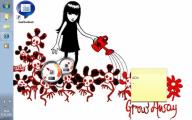 dale
dale
geschrieben 03. Februar 2009 - 19:28
 ralf846153
geschrieben 05. Februar 2009 - 10:29
Xenon
geschrieben 05. Februar 2009 - 15:02
Kirill
geschrieben 05. Februar 2009 - 17:10
evil.baschdi
geschrieben 12. Februar 2009 - 07:34

Dieser Beitrag wurde von mister-x bearbeitet: 12. Februar 2009 - 07:35
doggy
geschrieben 12. Februar 2009 - 19:54
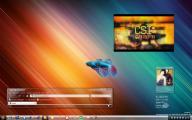


 Nach oben