Hilfe
Hilfe

 Neues Thema
 Antworten




nach langer Zeit melde ich mich mal wieder.
Mein Primärsystem mit Windows 11 Pro 23H2 weigert sich auf 24H2 aktualisiert zu werden mit dem Fehlercode "0x80070002".
System ist ohne weiteres Win11 fähig:
CPU: 5900x mit aktuellen Bios auf einem Asrock B350 Pro4
32GB Ram
TPM und UEFI/SecureBoot aktiv
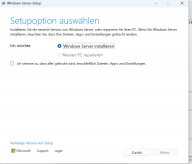
Weder per Inplace Update noch direkt per Boot from USB Stick bietet er mir einen Migration an. Nur eine Neuinstallation.
Ich möchte aber meine Daten und Anwendungen behalten.
Was habe ich schon alles gemacht:
* lokalen administrativen erstellt
* Dokumente und Downloads wieder von D auf C verlinkt (C ist eine NVME SSD, D das HDD Datengrab)
* Zeit des Windows Systems stimmt
* installierte Sprache und ISO ist deutsch
* Windows Update Assistent probiert, offielles ISO probiert, ISOs mit gepatchtem TPM/UEFI Abfrage probiert
Egal wie, er sagt der Upgradepfad ist nicht verfügbar, sagt aber nicht genau warum.
Als Besonderheit habe ich, dass ich für D Primocache verwendet (eine weitere SSD dient als Cache Laufwerk für Daten auf D)
MOSetup/Bluebox.log
2024-11-22 14:00:12: *******SetupHost Logging Begin*******

2024-11-22 13:58:17: Process exit code: [0x80070490]
2024-11-22 13:58:17: LaunchProcessInSession: Error = 0x80070490
2024-11-22 13:58:17: LaunchProcessInSession returned: [0x80070490]
2024-11-22 13:58:17: Checking cleanup registry value...
2024-11-22 13:58:17: Performing cleanup level: [0x2]
2024-11-22 13:58:17: Populating preservation paths...
2024-11-22 13:58:17: Acquiring privileges...
2024-11-22 13:58:17: Cleaning install folder...
2024-11-22 13:58:17: Protecting folder: [C:\$WINDOWS.~BT\Sources]...
2024-11-22 13:58:17: Cleaning parent folder: [C:\$WINDOWS.~BT\Sources]...
2024-11-22 13:58:17: Protecting folder: [C:\$WINDOWS.~BT\Sources\Diagnostics]...
2024-11-22 13:58:17: Protecting folder: [C:\$WINDOWS.~BT\Sources\Panther]...
2024-11-22 13:58:17: Cleaning MoSetup Volatile key...
2024-11-22 13:58:17: Removing CorrelationVector registry value...
2024-11-22 13:58:17: Removing cleanup registry value...
2024-11-22 13:58:17: Flushing MoSetup registry key...
2024-11-22 13:58:17: Cleanup was successful.
2024-11-22 13:58:17: MainHr: Error = 0x80070490
2024-11-22 13:58:17: wWinMain: Error = 0x80070490
2024-11-22 13:59:22: BuildInfo: [10.0.26100.1 (ge_release.240331-1435)]
2024-11-22 13:59:22: CommandLine: [C:\$GetCurrent\media\Sources\SetupPrep.exe /boot /migchoice upgrade /showoobe none /Compat IgnoreWarning /eula accept /noreboot /postoobe C:\$GetCurrent\SafeOS\SetupComplete.cmd /CorrelationVector UxH2+tUNrEW/cXrE.999 /ClientId Win10UA:VNL:URL::<1.4.19041.5003>:<1>:{39D209F0-4319-48E2-82A4-1C92DBB11E3B}:[10.0.22631]:[2] /DynamicUpdate Enable /telemetry enable /UpdateMedia Decline /SkipSummary]
2024-11-22 13:59:22: Detecting Product from config file.
2024-11-22 13:59:22: ParseCommandLine: Product from Setup.cfg: [0]
2024-11-22 13:59:22: Deleting box result...
2024-11-22 13:59:22: Checking cleanup registry value...
2024-11-22 13:59:22: Cleanup value missing... assuming no cleanup.
2024-11-22 13:59:22: Skipping cleanup.
2024-11-22 13:59:22: Preserve working path: [No]
2024-11-22 13:59:22: Cleaning alternate storage paths...
2024-11-22 13:59:22: Cleaning MoSetup Volatile key...
2024-11-22 13:59:22: Removing CorrelationVector registry value...
2024-11-22 13:59:22: Removing cleanup registry value...
2024-11-22 13:59:22: Flushing MoSetup registry key...
2024-11-22 13:59:22: Cleaning working dir...
2024-11-22 13:59:22: Attempting to preserve existing logs...
2024-11-22 13:59:22: Cleaning path: [C:\WINDOWS\Panther\NewOs]...
2024-11-22 13:59:22: Creating path: [C:\WINDOWS\Panther\NewOs\Panther]...
2024-11-22 13:59:22: Copying [C:\$WINDOWS.~BT\Sources\Panther] -> [C:\WINDOWS\Panther\NewOs\Panther]...
2024-11-22 13:59:22: Attempting to clean installation drive at [C]...
2024-11-22 13:59:22: Acquiring privileges...
2024-11-22 13:59:22, Info                         SPCleanupInstallationDrive: Cleaning up C:\
2024-11-22 13:59:22, Info                         Active tracing sessions:
2024-11-22 13:59:22, Info                           Session name: Circular Kernel Context Logger
2024-11-22 13:59:22, Info                             Log file name:
2024-11-22 13:59:22, Info                             Log file mode: 0x02800480
2024-11-22 13:59:22, Info                             Flush timer: 0
2024-11-22 13:59:22, Info                             Enable flags: 0x00002065
2024-11-22 13:59:22, Info                           Session name: AppModel
2024-11-22 13:59:22, Info                             Log file name:
2024-11-22 13:59:22, Info                             Log file mode: 0x10808400
2024-11-22 13:59:22, Info                             Flush timer: 0
2024-11-22 13:59:22, Info                             Enable flags: 0x00000000
2024-11-22 13:59:22, Info                           Session name: DiagLog
2024-11-22 13:59:22, Info                             Log file name:
2024-11-22 13:59:22, Info                             Log file mode: 0x10800180
2024-11-22 13:59:22, Info                             Flush timer: 1
2024-11-22 13:59:22, Info                             Enable flags: 0x00000000
2024-11-22 13:59:22, Info                           Session name: Diagtrack-Listener
2024-11-22 13:59:22, Info                             Log file name:
2024-11-22 13:59:22, Info                             Log file mode: 0x08800110
2024-11-22 13:59:22, Info                             Flush timer: 300
2024-11-22 13:59:22, Info                             Enable flags: 0x00000000
2024-11-22 13:59:22, Info                           Session name: EventLog-Application
2024-11-22 13:59:22, Info                             Log file name:
2024-11-22 13:59:22, Info                             Log file mode: 0x19800180
2024-11-22 13:59:22, Info                             Flush timer: 1
2024-11-22 13:59:22, Info                             Enable flags: 0x00000000
2024-11-22 13:59:22, Info                           Session name: EventLog-Microsoft-Windows-WorkFolders-WHC
2024-11-22 13:59:22, Info                             Log file name:
2024-11-22 13:59:22, Info                             Log file mode: 0x11800180
2024-11-22 13:59:22, Info                             Flush timer: 1
2024-11-22 13:59:22, Info                             Enable flags: 0x00000000
2024-11-22 13:59:22, Info                           Session name: EventLog-System
2024-11-22 13:59:22, Info                             Log file name:
2024-11-22 13:59:22, Info                             Log file mode: 0x98800180
2024-11-22 13:59:22, Info                             Flush timer: 1
2024-11-22 13:59:22, Info                             Enable flags: 0x00000000
2024-11-22 13:59:22, Info                           Session name: FamilySafetyAOT
2024-11-22 13:59:22, Info                             Log file name: C:\WINDOWS\system32\Logfiles\WMI\FamilySafetyAOT.etl
2024-11-22 13:59:22, Info                             Log file mode: 0x00800002
2024-11-22 13:59:22, Info                             Flush timer: 0
2024-11-22 13:59:22, Info                             Enable flags: 0x00000000
2024-11-22 13:59:22, Info                           Session name: LwtNetLog
2024-11-22 13:59:22, Info                             Log file name: C:\WINDOWS\System32\LogFiles\WMI\LwtNetLog.etl
2024-11-22 13:59:22, Info                             Log file mode: 0x00800002
2024-11-22 13:59:22, Info                             Flush timer: 0
2024-11-22 13:59:22, Info                             Enable flags: 0x00000000
2024-11-22 13:59:22, Info                           Session name: Microsoft-Windows-Rdp-Graphics-RdpIdd-Trace
2024-11-22 13:59:22, Info                             Log file name: C:\WINDOWS\system32\Logfiles\WMI\Microsoft-Windows-Rdp-Graphics-RdpIdd-Trace.etl
2024-11-22 13:59:22, Info                             Log file mode: 0x80800002
2024-11-22 13:59:22, Info                             Flush timer: 0
2024-11-22 13:59:22, Info                             Enable flags: 0x00000000
2024-11-22 13:59:22, Info                           Session name: NetCore
2024-11-22 13:59:22, Info                             Log file name: C:\WINDOWS\System32\LogFiles\WMI\NetCore.etl
2024-11-22 13:59:22, Info                             Log file mode: 0x00800022
2024-11-22 13:59:22, Info                             Flush timer: 0
2024-11-22 13:59:22, Info                             Enable flags: 0x00000000
2024-11-22 13:59:22, Info                           Session name: NtfsLog
2024-11-22 13:59:22, Info                             Log file name:
2024-11-22 13:59:22, Info                             Log file mode: 0x10808400
2024-11-22 13:59:22, Info                             Flush timer: 0
2024-11-22 13:59:22, Info                             Enable flags: 0x00000000
2024-11-22 13:59:22, Info                           Session name: RadioMgr
2024-11-22 13:59:22, Info                             Log file name: C:\WINDOWS\System32\LogFiles\WMI\RadioMgr.etl
2024-11-22 13:59:22, Info                             Log file mode: 0x00800022
2024-11-22 13:59:22, Info                             Flush timer: 0
2024-11-22 13:59:22, Info                             Enable flags: 0x00000000
2024-11-22 13:59:22, Info                           Session name: ReFSLog
2024-11-22 13:59:22, Info                             Log file name: C:\WINDOWS\system32\Logfiles\WMI\ReFSLog.etl
2024-11-22 13:59:22, Info                             Log file mode: 0x00800000
2024-11-22 13:59:22, Info                             Flush timer: 0
2024-11-22 13:59:22, Info                             Enable flags: 0x00000000
2024-11-22 13:59:22, Info                           Session name: UBPM
2024-11-22 13:59:22, Info                             Log file name:
2024-11-22 13:59:22, Info                             Log file mode: 0x108001d0
2024-11-22 13:59:22, Info                             Flush timer: 20
2024-11-22 13:59:22, Info                             Enable flags: 0x00000000
2024-11-22 13:59:22, Info                           Session name: WdiContextLog
2024-11-22 13:59:22, Info                             Log file name: C:\WINDOWS\System32\WDI\LogFiles\WdiContextLog.etl.001
2024-11-22 13:59:22, Info                             Log file mode: 0x00800082
2024-11-22 13:59:22, Info                             Flush timer: 0
2024-11-22 13:59:22, Info                             Enable flags: 0x00000000
2024-11-22 13:59:22, Info                           Session name: WiFiSession
2024-11-22 13:59:22, Info                             Log file name: C:\WINDOWS\System32\LogFiles\WMI\Wifi.etl
2024-11-22 13:59:22, Info                             Log file mode: 0x80800002
2024-11-22 13:59:22, Info                             Flush timer: 0
2024-11-22 13:59:22, Info                             Enable flags: 0x00000000
2024-11-22 13:59:22, Info                           Session name: UpdateSessionOrchestration
2024-11-22 13:59:22, Info                             Log file name: C:\ProgramData\USOShared\Logs\System\UpdateSessionOrchestration.b7461029-0fb5-433c-b0dd-69f40ec891d2.2.etl
2024-11-22 13:59:22, Info                             Log file mode: 0x10802009
2024-11-22 13:59:22, Info                             Flush timer: 60
2024-11-22 13:59:22, Info                             Enable flags: 0x00000000
2024-11-22 13:59:22, Info                           Session name: SHS-11222024-105019-7-1ff
2024-11-22 13:59:22, Info                             Log file name: C:\ProgramData\Microsoft\Windows Security Health\Logs\SHS-11222024-105019-7-1ff-22621.1.amd64fre.ni_release.220506-1250.etl
2024-11-22 13:59:22, Info                             Log file mode: 0x00800002
2024-11-22 13:59:22, Info                             Flush timer: 0
2024-11-22 13:59:22, Info                             Enable flags: 0x00000000
2024-11-22 13:59:22, Info                           Session name: SleepStudyTraceSession
2024-11-22 13:59:22, Info                             Log file name: C:\WINDOWS\system32\SleepStudy\SleepStudyTraceSession.etl
2024-11-22 13:59:22, Info                             Log file mode: 0x10800002
2024-11-22 13:59:22, Info                             Flush timer: 0
2024-11-22 13:59:22, Info                             Enable flags: 0x00000000
2024-11-22 13:59:22, Info                           Session name: CldFltLog
2024-11-22 13:59:22, Info                             Log file name: C:\WINDOWS\System32\LogFiles\CloudFiles\CldFlt1.etl
2024-11-22 13:59:22, Info                             Log file mode: 0x90800002
2024-11-22 13:59:22, Info                             Flush timer: 0
2024-11-22 13:59:22, Info                             Enable flags: 0x00000000
2024-11-22 13:59:22, Info                           Session name: NVIDIA-NVTOPPS-FILTER
2024-11-22 13:59:22, Info                             Log file name:
2024-11-22 13:59:22, Info                             Log file mode: 0x10800100
2024-11-22 13:59:22, Info                             Flush timer: 1
2024-11-22 13:59:22, Info                             Enable flags: 0x00000000
2024-11-22 13:59:22, Info                           Session name: NVIDIA-NVTOPPS-NOCAT
2024-11-22 13:59:22, Info                             Log file name:
2024-11-22 13:59:22, Info                             Log file mode: 0x10800100
2024-11-22 13:59:22, Info                             Flush timer: 1
2024-11-22 13:59:22, Info                             Enable flags: 0x00000000
2024-11-22 13:59:22, Info                           Session name: GamingServices
2024-11-22 13:59:22, Info                             Log file name: C:\WINDOWS\system32\LogFiles\WMI\GamingServices.etl
2024-11-22 13:59:22, Info                             Log file mode: 0x10808002
2024-11-22 13:59:22, Info                             Flush timer: 0
2024-11-22 13:59:22, Info                             Enable flags: 0x00000000
2024-11-22 13:59:22, Info                           Session name: WPR_initiated_DiagTrackMiniLogger_WPR System Collector
2024-11-22 13:59:22, Info                             Log file name:
2024-11-22 13:59:22, Info                             Log file mode: 0x0a800480
2024-11-22 13:59:22, Info                             Flush timer: 0
2024-11-22 13:59:22, Info                             Enable flags: 0x00000003
2024-11-22 13:59:22, Info                           Session name: ScreenOnPowerStudyTraceSession
2024-11-22 13:59:22, Info                             Log file name: C:\WINDOWS\system32\SleepStudy\ScreenOn\ScreenOnPowerStudyTraceSession-2024-11-22-12-55-01.etl
2024-11-22 13:59:22, Info                             Log file mode: 0x10800002
2024-11-22 13:59:22, Info                             Flush timer: 0
2024-11-22 13:59:22, Info                             Enable flags: 0x00000000
2024-11-22 13:59:22, Info                           Session name: MpWppCoreTracing-20241122-105008-00000003-100000000
2024-11-22 13:59:22, Info                             Log file name: C:\ProgramData\Microsoft\Windows Defender\Support\MpWppCoreTracing-20241122-105008-00000003-100000000.bin
2024-11-22 13:59:22, Info                             Log file mode: 0x00800002
2024-11-22 13:59:22, Info                             Flush timer: 0
2024-11-22 13:59:22, Info                             Enable flags: 0x00000000
2024-11-22 13:59:22, Info                           Session name: MpWppTracing-20241122-095008-00000003-fffffffeffffffff
2024-11-22 13:59:22, Info                             Log file name: C:\ProgramData\Microsoft\Windows Defender\Support\MpWppTracing-20241122-095008-00000003-fffffffeffffffff.bin
2024-11-22 13:59:22, Info                             Log file mode: 0x00800002
2024-11-22 13:59:22, Info                             Flush timer: 0
2024-11-22 13:59:22, Info                             Enable flags: 0x00000000
2024-11-22 13:59:22, Info                           Session name: 1DSListener
2024-11-22 13:59:22, Info                             Log file name:
2024-11-22 13:59:22, Info                             Log file mode: 0x08800180
2024-11-22 13:59:22, Info                             Flush timer: 5
2024-11-22 13:59:22, Info                             Enable flags: 0x00000000
2024-11-22 13:59:22, Info                           Session name: MoUxCoreWorker
2024-11-22 13:59:22, Info                             Log file name: C:\ProgramData\USOShared\Logs\System\MoUxCoreWorker.af612c1c-1d92-48b6-8f18-482788028786.1.etl
2024-11-22 13:59:22, Info                             Log file mode: 0x10802009
2024-11-22 13:59:22, Info                             Flush timer: 60
2024-11-22 13:59:22, Info                             Enable flags: 0x00000000
2024-11-22 13:59:22, Info                           Session name: WPR_initiated_DiagTrackMiniLogger_OneTrace_User_Logger_20240808_1_EC_0
2024-11-22 13:59:22, Info                             Log file name:
2024-11-22 13:59:22, Info                             Log file mode: 0x08800400
2024-11-22 13:59:22, Info                             Flush timer: 0
2024-11-22 13:59:22, Info                             Enable flags: 0x00000000
2024-11-22 13:59:22, Info                           Session name: 8696EAC4-1288-4288-A4EE-49EE431B0AD9
2024-11-22 13:59:22, Info                             Log file name: C:\WINDOWS\ServiceProfiles\NetworkService\AppData\Local\Microsoft\Windows\DeliveryOptimization\Logs\dosvc.20241122_095513_075.etl
2024-11-22 13:59:22, Info                             Log file mode: 0x11802002
2024-11-22 13:59:22, Info                             Flush timer: 0
2024-11-22 13:59:22, Info                             Enable flags: 0x00000000
2024-11-22 13:59:22, Info                           Session name: Microsoft.Windows.UpdateAssistantInstaller
2024-11-22 13:59:22, Info                             Log file name: C:\Program Files (x86)\WindowsInstallationAssistant\Logs\UpdateAssistantInstllr.001.etl
2024-11-22 13:59:22, Info                             Log file mode: 0x10406002
2024-11-22 13:59:22, Info                             Flush timer: 0
2024-11-22 13:59:22, Info                             Enable flags: 0x00000000
2024-11-22 13:59:22, Info                           Session name: Terminal-Services-LSM-ApplicationLag-2796
2024-11-22 13:59:22, Info                             Log file name:
2024-11-22 13:59:22, Info                             Log file mode: 0x00800102
2024-11-22 13:59:22, Info                             Flush timer: 1
2024-11-22 13:59:22, Info                             Enable flags: 0x00000000
2024-11-22 13:59:22, Info                           Session name: WindowsUpdate_trace_log
2024-11-22 13:59:22, Info                             Log file name: C:\WINDOWS\Logs\WindowsUpdate\WindowsUpdate.20241122.135353.042.3.etl
2024-11-22 13:59:22, Info                             Log file mode: 0x11802009
2024-11-22 13:59:22, Info                             Flush timer: 0
2024-11-22 13:59:22, Info                             Enable flags: 0x00000000
2024-11-22 13:59:22, Info                         Filter WinSetupMon not installed; nothing to unload
2024-11-22 13:59:22, Info                         SPCleanupInstallationDrive: Not suspended data in registry keys, no need for cleanup
2024-11-22 13:59:22, Info                         DeletePath: Attempting to obliterate [C:\$WINDOWS.~BT] (final path [\\?\Volume{29ee033e-26bd-11ec-883b-e6b03a9e2f16}\$WINDOWS.~BT]).
2024-11-22 13:59:22: Creating path (with ACL): [C:\$WINDOWS.~BT]...
2024-11-22 13:59:22: Creating path: [C:\$WINDOWS.~BT\Sources]...
2024-11-22 13:59:22: Launching process: [C:\$GetCurrent\media\Sources\SetupHost.exe] with command-line [/Install /Boot /Eula Accept  /InstallFile "C:\$GetCurrent\media\Sources\Install.esd" "/migchoice" "upgrade" "/showoobe" "none" "/Compat" "IgnoreWarning" "/noreboot" "/postoobe" "C:\$GetCurrent\SafeOS\SetupComplete.cmd" "/CorrelationVector" "UxH2+tUNrEW/cXrE.999" "/ClientId" "Win10UA:VNL:URL::<1.4.19041.5003>:<1>:{39D209F0-4319-48E2-82A4-1C92DBB11E3B}:[10.0.22631]:[2]" "/DynamicUpdate" "Enable" "/telemetry" "enable" "/UpdateMedia" "Decline" "/SkipSummary" /MediaPath "C:\$GetCurrent\media"] in Session: [-1]
2024-11-22 13:59:22: Launching: [C:\$GetCurrent\media\Sources\SetupHost.exe] [/Install /Boot /Eula Accept  /InstallFile "C:\$GetCurrent\media\Sources\Install.esd" "/migchoice" "upgrade" "/showoobe" "none" "/Compat" "IgnoreWarning" "/noreboot" "/postoobe" "C:\$GetCurrent\SafeOS\SetupComplete.cmd" "/CorrelationVector" "UxH2+tUNrEW/cXrE.999" "/ClientId" "Win10UA:VNL:URL::<1.4.19041.5003>:<1>:{39D209F0-4319-48E2-82A4-1C92DBB11E3B}:[10.0.22631]:[2]" "/DynamicUpdate" "Enable" "/telemetry" "enable" "/UpdateMedia" "Decline" "/SkipSummary" /MediaPath "C:\$GetCurrent\media"] from []!
2024-11-22 13:59:22: Waiting for process events...

2024-11-22 14:00:12: SetupHost: Logging begins.
SetupHost: Requesting EcoQos...
SetupHost: SetupHost initialization completed. Starting execution

2024-11-22 14:00:12: *******SetupHost Logging End*******
2024-11-22 14:00:12: Process exit code: [0x800704C7]
2024-11-22 14:00:12: LaunchProcessInSession: Error = 0x800704C7
2024-11-22 14:00:12: LaunchProcessInSession returned: [0x800704C7]
2024-11-22 14:00:12: Checking cleanup registry value...
2024-11-22 14:00:12: Performing cleanup level: [0x1]
2024-11-22 14:00:12: Populating preservation paths...
2024-11-22 14:00:12: Acquiring privileges...
2024-11-22 14:00:12: Cleaning install folder...
2024-11-22 14:00:12: Protecting folder: [C:\$WINDOWS.~BT\Sources]...
2024-11-22 14:00:12: Cleaning parent folder: [C:\$WINDOWS.~BT\Sources]...
2024-11-22 14:00:12: Protecting folder: [C:\$WINDOWS.~BT\Sources\Diagnostics]...
2024-11-22 14:00:12: Protecting folder: [C:\$WINDOWS.~BT\Sources\Panther]...
2024-11-22 14:00:12: Cleaning MoSetup Volatile key...
2024-11-22 14:00:12: Removing CorrelationVector registry value...
2024-11-22 14:00:12: Removing cleanup registry value...
2024-11-22 14:00:12: Flushing MoSetup registry key...
2024-11-22 14:00:12: Cleanup was successful.
2024-11-22 14:00:12: MainHr: Error = 0x800704C7
2024-11-22 14:00:12: wWinMain: Error = 0x800704C7
2024-11-22 14:40:29: BuildInfo: [10.0.26100.1 (ge_release.240331-1435)]
2024-11-22 14:40:29: CommandLine: ["E:\sources\setupprep.exe" ]
2024-11-22 14:40:29: Opening Box: [E:\sources\setupprep.exe]
2024-11-22 14:40:29: Opening Box Result: [0x0]
2024-11-22 14:40:29: Detecting Product from config file.
2024-11-22 14:40:29: ParseCommandLine: Product from Setup.cfg: [0]
2024-11-22 14:40:29: Deleting box result...
2024-11-22 14:40:29: ScenarioCtrlHelpers::GenerateBoxHash: Calculating file hash...
2024-11-22 14:40:29: ScenarioCtrlHelpers::VerifySetupVersionMatch: Previous file hash not found.
2024-11-22 14:40:29: VersionMatch: [No]
2024-11-22 14:40:29: StateMatch: Attempting to get Installation Scenario from registry...
2024-11-22 14:40:29: StateMatch: [No]
2024-11-22 14:40:29: ResumeMode: [No]
2024-11-22 14:40:29: OsUninstallWarning: Execute file found [FALSE].
2024-11-22 14:40:29: OsUninstallWarning: [No]
2024-11-22 14:40:29: Checking cleanup registry value...
2024-11-22 14:40:29: Cleanup value missing... assuming no cleanup.
2024-11-22 14:40:29: Skipping cleanup.
2024-11-22 14:40:29: Cleaning alternate storage paths...
2024-11-22 14:40:29: Cleaning MoSetup Volatile key...
2024-11-22 14:40:29: Removing CorrelationVector registry value...
2024-11-22 14:40:29: Removing cleanup registry value...
2024-11-22 14:40:29: Flushing MoSetup registry key...
2024-11-22 14:40:29: Cleaning working dir...
2024-11-22 14:40:29: Creating path (with ACL): [C:\$WINDOWS.~BT]...
2024-11-22 14:40:29: Creating path: [C:\$WINDOWS.~BT\Sources]...
2024-11-22 14:40:29: ScenarioCtrlHelpers::SetStateInRegistry: Setting Current Scenario: [0x1]...
2024-11-22 14:40:29: ScenarioCtrlHelpers::SetStateInRegistry: Setting Install mode...
2024-11-22 14:40:29: ScenarioCtrlHelpers::GenerateBoxHash: Calculating file hash...
2024-11-22 14:40:30: Launching process: [C:\$WINDOWS.~BT\Sources\SetupHost.exe] with command-line [/Install /Media  /InstallFile "E:\sources\Install.wim" /MediaPath "E:"] in Session: [-1]
2024-11-22 14:40:30: Launching: [C:\$WINDOWS.~BT\Sources\SetupHost.exe] [/Install /Media  /InstallFile "E:\sources\Install.wim" /MediaPath "E:"] from []!
2024-11-22 14:40:30: LaunchProcessInSession: Error = 0x80070002
2024-11-22 14:40:30: SetupHost process returned: [0x80070002], but SetupHostResult registry key was missing.
2024-11-22 14:40:30: LaunchProcessInSession returned: [0x80070002]
2024-11-22 14:40:30: Checking cleanup registry value...
2024-11-22 14:40:30: Cleanup value missing... assuming no cleanup.
2024-11-22 14:40:30: Skipping cleanup.
2024-11-22 14:40:30: MainHr: Error = 0x80070002
2024-11-22 14:40:30: wWinMain: Error = 0x80070002
Dieser Beitrag wurde von tavoc bearbeitet: 24. November 2024 - 21:04
 Nach oben