
 Hilfe
Hilfe
 Neues Thema
 Antworten



Zitat
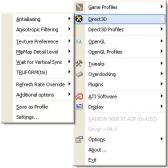
A small utility that can be found in the windows tray which then allows instant access to options and settings. Quite handy and quite a small download.
- Overclocking with templates
- Direct3D settings with templates, GUI form and tray popup menu
- OpenGL settings with templates, GUI form and tray popup menu
- Tweak for overriding Pixel and Vertex Shaders
- Speed improvements tweaks for Anisotropic Filtering
- Support for system options, VPU Recover, DMA Copy and so on
- Support for MMC applications
What's New:
+ If you have version less than 1.0.0.333, you must manualy uninstall ATI Tray Tools and restart computer before install this build.
+ Added support for changing resolutions. Click left mouse button on Icon in tray area and select resolution.
- Overclocking with templates
- Direct3D settings with templates, GUI form and tray popup menu
- OpenGL settings with templates, GUI form and tray popup menu
- Tweak for overriding Pixel and Vertex Shaders
- Speed improvements tweaks for Anisotropic Filtering
- Support for system options, VPU Recover, DMA Copy and so on
- Support for MMC applications
What's New:
+ If you have version less than 1.0.0.333, you must manualy uninstall ATI Tray Tools and restart computer before install this build.
+ Added support for changing resolutions. Click left mouse button on Icon in tray area and select resolution.
Download
Homepage
Angehängte Miniaturbilder
Dieser Beitrag wurde von EDragon bearbeitet: 14. Juni 2004 - 15:06
 Nach oben


 habe schon gehofft dass dies ne neue version ist, hoffe dass die dann meine probs löst denn an sich ist das tool recht gut, bietet alle mögliche einstellungen (auch temporal antialiasing) und ist leicht zu bedienen


